
50 Trivia Questions Kids and Adults Can Play Together
It is that time of year when school is DONE and kids are itching to spend a couple of months having fun. As a parent to kids who are interested in everything and want to know more about the world, I know how exhausting it is to keep their minds occupied. Well, I am here to provide a little bit of help. I’ve put together 50 trivia questions that work perfectly for kids and adults! The questions are split into three rounds – Easy (great for younger players), Medium (the whole family should get a crack at these), and Tricky (even the adults might struggle).
Want to download these as handouts? Click this link for the Question Handout and this link for the Answer Handout.
Easy Questions 1–20
- What color is a school bus?Answer: Yellow
- How many legs does a spider have?Answer: Eight
- What do bees make?Answer: Honey
- What is the name of the toy cowboy in Toy Story?Answer: Woody
- What planet do we live on?Answer: Earth
- How many days are in a week?Answer: Seven
- What animal says “moo”?Answer: A cow
- What is the largest animal in the world?Answer: The blue whale
- What shape has three sides?Answer: A triangle
- Who lives at the North Pole?Answer: Santa Claus
- What fruit is yellow and curved?Answer: A banana
- What do you use to write on a blackboard?Answer: Chalk
- How many fingers does a human have?Answer: Ten
- What is the color of the sky on a clear day?Answer: Blue
- What animal is known for its black and white stripes?Answer: A zebra
- What sound does a duck make?Answer: Quack
- What do caterpillars turn into?Answer: Butterflies (or moths)
- Which is tallest — a house, a skyscraper, or a tree?Answer: A skyscraper
- What meal do most people eat in the morning?Answer: Breakfast
- What is Mickey Mouse’s pet dog called?Answer: Pluto
Medium Questions 21–35
- What is the capital of France?Answer: Paris
- How many players are on a soccer team?Answer: Eleven
- What is the fastest land animal?Answer: The cheetah
- Who wrote the Harry Potter series?Answer: J.K. Rowling
- What gas do plants absorb from the air?Answer: Carbon dioxide (CO₂)
- What is the largest planet in our solar system?Answer: Jupiter
- In which country were the first Olympic Games held?Answer: Greece
- What is the chemical symbol for water?Answer: H₂O
- What do you call a baby kangaroo?Answer: A joey
- How many strings does a standard guitar have?Answer: Six
- Which ocean is the largest?Answer: The Pacific Ocean
- What is the hardest natural substance on Earth?Answer: Diamond
- Who painted the Mona Lisa?Answer: Leonardo da Vinci
- What year did the Titanic sink?Answer: 1912
- What is the name of the ship in Moby Dick?Answer: The Pequod
Tricky Questions 36–50
- How many bones are in the adult human body?Answer: 206
- What is the smallest country in the world?Answer: Vatican City
- Which element has the symbol “Au”?Answer: Gold
- What is the only mammal capable of true flight?Answer: The bat
- What year did the Berlin Wall fall?Answer: 1989
- Which country has the most natural lakes?Answer: Canada
- What is the largest desert in the world?Answer: The Antarctic Desert
- How many moons does Mars have?Answer: Two (Phobos and Deimos)
- Who invented the World Wide Web?Answer: Tim Berners-Lee
- What is the only country that borders both Spain and France?Answer: Andorra
- Which language is most widely spoken in the world?Answer: Mandarin Chinese
- What year did the first iPhone launch?Answer: 2007
- In Greek mythology, who was the god of the sea?Answer: Poseidon
- What is the approximate speed of light?Answer: 299,792 km/s
- Which planet is known as the Red Planet?Answer: Mars
150 Random Trivia Questions for an Amazing Game Night!
Have a game night and you are not sure what to do? Here are 150 Random Trivia Questions from RandomTriviaGenerator.com to give you an easy start to an amazing game night. Don’t be afraid to share the questions on the big screen. All answers are hidden!
Want to download these as handouts? Click this link for the Question Handout and this link for the Answer Handout.
Easy Questions 1–50
#1What is the capital of France?
#2How many sides does a hexagon have?
#3What planet is known as the Red Planet?
#4Who painted the Mona Lisa?
#5What is the largest ocean on Earth?
#6In what year did the Titanic sink?
#7What is the chemical symbol for water?
#8How many stripes are on the American flag?
#9What sport is played at Wimbledon?
#10Who wrote Romeo and Juliet?
#11What is the fastest land animal?
#12Which country is home to the kangaroo?
#13What is 12 × 12?
#14What color are emeralds?
#15How many bones are in the adult human body?
#16What language is spoken in Brazil?
#17Which planet is closest to the Sun?
#18What is the tallest mountain in the world?
#19How many players are on a basketball team on the court at once?
#20What is the name of Mickey Mouse’s dog?
#21What fruit is known as the ‘king of fruits’ in Southeast Asia?
#22In which country was the Eiffel Tower built?
#23What does ‘HTTP’ stand for?
#24Which ocean is the smallest?
#25How many days are in a leap year?
#26What is the national sport of Japan?
#27Who is the author of Harry Potter?
#28What is the hardest natural substance on Earth?
#29How many continents are there on Earth?
#30What animal is on the WWF logo?
#31In what country were the first Olympic Games held?
#32What is the square root of 64?
#33What is the name of the fairy in Peter Pan?
#34Which U.S. state has the most coastline?
#35How many keys does a standard piano have?
#36What gas do plants absorb during photosynthesis?
#37What is the currency of Japan?
#38Who played James Bond in Casino Royale (2006)?
#39How many Oscars did Titanic win?
#40What is the most-spoken language in the world?
#41Which element has the atomic number 1?
#42What is the longest river in the world?
#43In which city are Buckingham Palace and the Tower of London?
#44What animal produces silk?
#45How many teeth does an adult human have?
#46What is the name of the ship in Moby Dick?
#47What is the most popular pizza topping in the US?
#48Who invented the telephone?
#49What color is the sky on a clear day?
#50What is the international dialing code for the United Kingdom?
Medium Questions 51–100
#51What is the smallest country in the world by area?
#52Which element has the symbol ‘Au’?
#53Who played the Joker in The Dark Knight (2008)?
#54What year was the Berlin Wall torn down?
#55In which country is the Great Barrier Reef located?
#56Which band released the album ‘Dark Side of the Moon’?
#57What is the phobia of spiders called?
#58What does the ‘www’ in a website address stand for?
#59How many players are on a rugby union team?
#60Who was the first woman to win a Nobel Prize?
#61What is the largest bone in the human body?
#62In which city is the Colosseum located?
#63What is the currency used in Switzerland?
#64Which Shakespeare play features the character Iago?
#65What is the capital city of Canada?
#66How many moons does Mars have?
#67Which company created the PlayStation?
#68What sport uses a ‘puck’?
#69Who painted the Sistine Chapel ceiling?
#70What year did World War I begin?
#71Which country gifted the Statue of Liberty to the USA?
#72What is the chemical symbol for iron?
#73In which U.S. state is Area 51 located?
#74Who wrote ‘A Brief History of Time’?
#75What country does the dish Pad Thai originate from?
#76What is the name of Batman’s butler?
#77Which ocean does the Amazon River drain into?
#78How many strings does a standard guitar have?
#79What does DNA stand for?
#80Who directed Jurassic Park (1993)?
#81Which country invented gunpowder?
#82What is the capital of South Korea?
#83In which decade did the Cold War officially end?
#84What is the largest desert in the world?
#85Which element is liquid at room temperature besides mercury?
#86Who invented the World Wide Web?
#87Which film won the first-ever Academy Award for Best Picture?
#88What is the name of the ship that brought the Pilgrims to America?
#89How many chambers does the human heart have?
#90Which country has the most natural lakes?
#91What is the world’s best-selling video game of all time?
#92Who sang ‘Purple Rain’?
#93What is the approximate speed of light in a vacuum?
#94In Greek mythology, who was the god of the sea?
#95Which two countries share the longest international border?
#96What year did the first iPhone launch?
#97Which artist famously cut off their own ear?
#98What does ‘LED’ stand for?
#99Which Roman god is the planet Neptune named after?
#100What is the only mammal capable of true flight?
Hard Questions 101–150
#101What is the only country that borders both Spain and France?
#102Who was the first person to walk on the Moon?
#103What year was the Magna Carta signed?
#104Which artist holds the record for the most Grammy wins in history?
#105What is the Chandrasekhar Limit?
#106In which year did the Soviet Union launch Sputnik 1?
#107What is the rarest blood type?
#108Who wrote ‘Crime and Punishment’?
#109What is the capital of Burkina Faso?
#110What is the 10th number in the Fibonacci sequence?
#111Which country has won the most FIFA World Cups?
#112Who was the Roman Emperor when Jesus was crucified?
#113What is the chemical formula for table salt?
#114Which war was triggered by the assassination of Archduke Franz Ferdinand?
#115What is the longest bone in the human body?
#116Who composed the opera ‘The Magic Flute’?
#117In what year was the United Nations founded?
#118What is the name of the treaty that ended World War I?
#119Which scientist proposed the theory of general relativity?
#120What is the approximate diameter of the Milky Way in light-years?
#121Which philosopher wrote ‘Critique of Pure Reason’?
#122What is the term for a group of crows?
#123Which element has the highest melting point?
#124What is the capital of Kazakhstan?
#125Who played the drill sergeant in Full Metal Jacket?
#126What year did the Chernobyl nuclear disaster occur?
#127Which ancient wonder of the world was located in Alexandria, Egypt?
#128What does the medical term ‘tachycardia’ mean?
#129Who wrote the novel ‘1984’?
#130In chemistry, what is an ‘isotope’?
#131What is the world’s oldest surviving written story?
#132Which country has the most UNESCO World Heritage Sites?
#133At what age did Tiger Woods first appear on TV playing golf?
#134In which European city is the Rijksmuseum located?
#135What is the largest known type of prime number called?
#136What is the proper term for the fear of long words?
#137Who was the only U.S. President never elected as President or Vice President?
#138What is the deepest lake in the world?
#139Which classical composer was deaf when he wrote his Ninth Symphony?
#140What percentage of the Earth’s atmosphere is nitrogen?
#141In which country is the ancient city of Petra located?
#142Who wrote the play ‘Waiting for Godot’?
#143What is the process by which rocks are broken down by weathering?
#144Who was the first European to reach India by sea?
#145What is the chemical symbol for tungsten?
#146Which country has the largest Muslim population in the world?
#147Who invented the printing press?
#148What is the powerhouse of the cell?
#149Which artist painted ‘The Persistence of Memory’ featuring melting clocks?
#150What is the only letter not appearing on the periodic table?
How Trivia Hosts Can Use Random Trivia Generator Accounts to Prepare for Weekly Trivia Night
If you host trivia night regularly, you know the prep work can be just as demanding as the event itself. Finding good questions, keeping track of what you’ve used, and organizing everything by theme or week – it adds up fast.
That’s why we built user accounts on Random Trivia Generator. With a free account, trivia hosts can save questions directly from the generator, organize them into custom lists, and walk into trivia night completely ready. Here’s exactly how to do it.
Step 1: Create Your Free Account
Getting started takes about thirty seconds. Head to randomtriviagenerator.com and click Sign Up in the top right corner. Enter your email and choose a password – that’s it. Or you can sign up with your Google account.
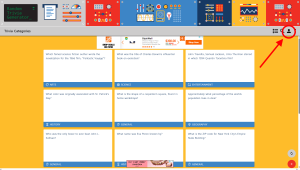
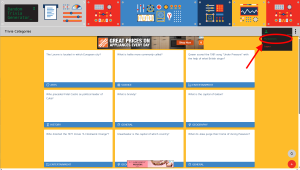
Once you’re signed in, you’ll notice a new My Questions section appear in the user navigation. This is your home base for organizing questions.
Step 2: Create a Week-Specific List
Before you start saving questions, create a list for the specific trivia night you’re preparing for. Think of each list as a folder for one session.
Navigate to My Questions and click Create New List. Give it a name that makes sense for your workflow – something like:
- May 14 Trivia Night
- Week 12 – Pop Culture Round
- Friday Pub Quiz – Sports Edition
Clear, dated names make it easy to find old lists and avoid accidentally reusing questions from a previous week.
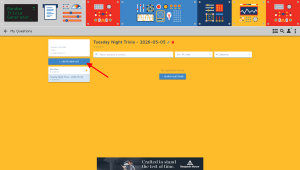
You can create as many lists as you need – one per week, one per category, or one per venue if you host at multiple locations.
Step 3: Browse Questions and Save the Ones You Want
Now for the fun part. Head back to the main generator and start browsing questions. When you find one you like, click the Star button on the back of the card.
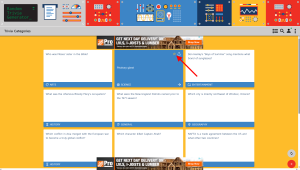
A small menu will appear asking you which list to add the question to. Select the list you just created for this week’s trivia night and confirm.
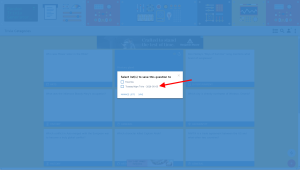
The question is now saved to your list. Repeat this as you browse through categories – film, history, sports, science, whatever mix suits your crowd.
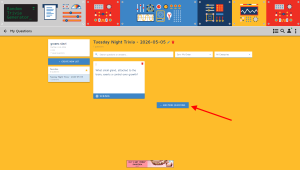
Or, you can press + Add More Questions and search for specific categories, questions, answers and more right there in the user space without going to the main page.
Step 4: Review and Finalize Your List
Once you’ve built up a solid pool of questions, head back to My Questions and open the list for this week. Here you can see everything you’ve saved in one place.
This is a good moment to:
- Check the mix of categories and difficulty levels
- Remove any questions that feel too easy, too obscure, or too similar to each other
- Make sure you have the right number of questions for your format
- Move and organize questions to best suit the flow for the night
Most pub quiz formats run 20–40 questions split across rounds. A good rule of thumb is to save 20–25% more than you need so you have room to cut anything that doesn’t feel right.
Step 5: Host with Confidence
On the night itself, open your list on your phone or laptop and you’re ready to go. No scrambling through browser tabs, no second-guessing which questions you’ve already used – everything is right there, organized exactly how you set it up.
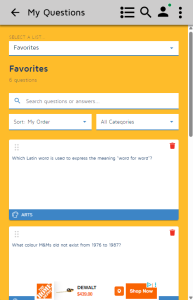
After the event, the list stays in your account. That means you have a permanent record of every question you’ve asked, which makes it easy to avoid repeats in future weeks.
Tips for Getting the Most Out of Your Lists
Name your lists consistently. A naming system like [Date] – [Theme] makes your archive much easier to navigate as it grows. Six months from now, you’ll thank yourself.
Build your list over a few days. The best questions don’t always appear in one sitting. Spend a few minutes with the generator each day leading up to trivia night and let the list grow naturally.
Use separate lists for separate rounds. If your trivia night has distinct rounds, say, a music round, a sports round, and a general knowledge round, consider making a separate list for each. It keeps things clean and makes it easy to swap one round out entirely if the crowd skews a certain way.
Keep a “bank” list for leftovers. When you cut questions from a week’s list, don’t delete them, move them to a general bank list. They’re often perfect for a future week.
Ready to Try It?
User accounts on Random Trivia Generator are completely free. Sign up here and start building your first list in under a minute.
If you host trivia regularly, this is genuinely the fastest way to go from zero to a polished, ready-to-run question set. Give it a try before your next event and see how much smoother the prep feels.
Have questions about using lists or accounts? Drop us a message – we’d love to hear how you’re using the site.
User Accounts and Over 30,000 Questions
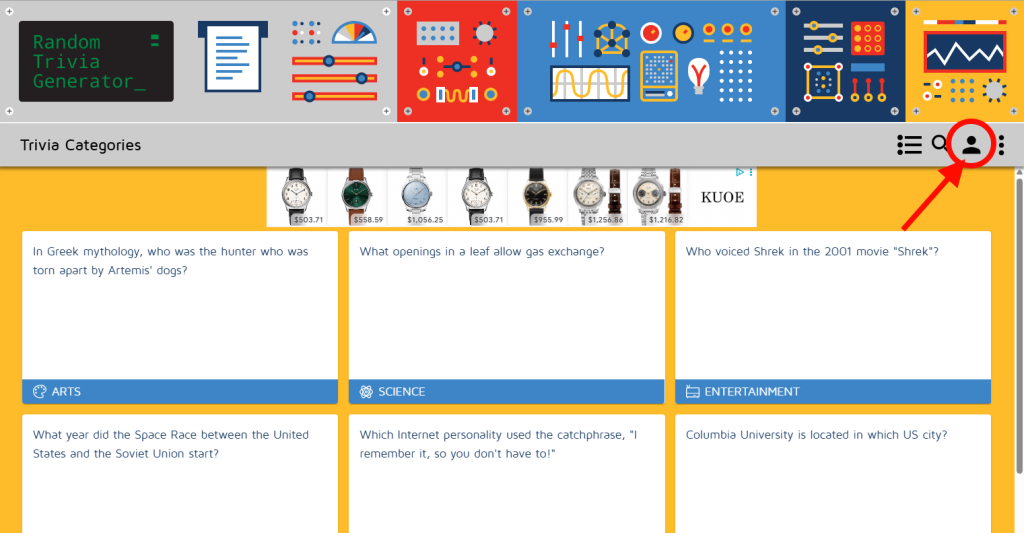
After a length break, I am back with blog updates!
After years of user requests, we recently launched user accounts. You can create a free account where you can save questions, make lists, and more. Create an account, save your questions and be ready for your next trivia night! Free!
Also, there are now over 30,000 human generated, curated, reviewed, edited questions.
Happy New Year and a 2022 Recap
On a personal level, the past couple of years have been very busy so I haven’t been keeping up with the blog. Many apologies. We added a new family member, moved across the province, completely renovated an older home, and more, including pouring a lot of time and resources in Random Trivia Generator. Over the course of 2022, the site was re-built from scratch with React to improve performance on newer devices and browsers. The rebuild also allows for additional features with 2 being finished and deployed in 2022. The site now has a search features and tags! Oh, and another 5,000 new questions.
Search
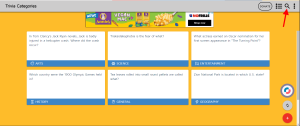
Searching sounds so simple…and it is. But simple search functions are dumb and spit out lists of mostly useless results. Custom search functions are not easy to implement. Look at Google. There were dozens of search engines when they emerged on the market but by developing a useful engine, they became the leader, and still are. I am not comparing Random Trivia Generator’s search feature to Google but it took a while to develop a mostly useful custom search engine based on tags, categories and a crafty filter. I say mostly because it is better than the default search feature the back-end database has, but still can’t read your mind and give the exact result you want. You should now be able to find questions a lot easier!
Tags
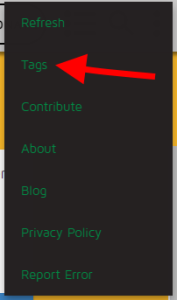
Tags are finally here! What are tags? They are like sub-categories, and sub-sub-categories that can better organize questions by more specific themes. The tags page is not randomized, but it rather shows the questions that have tags in order they appear in the database. With close to 30,000 trivia questions, I have only been able to tag about 6,000 of them so far. But I am continuously tagging questions so the entire database should be tagged soon enough for your browsing pleasure. Give tags a go by clicking on the menu and navigating to the tags page.
New Questions
Since the last update, about 2 years ago, approximately 5,000 new questions have been added to the database. A big thank you to all who have submitted questions! I have another 1,000 to review and approve. It shouldn’t take long to cross the 30,000 unique questions mark, thus making this database one of the larger ones online. None of the questions have been obtained through scraping or an API. All are either written by me or submitted by users.