
How Trivia Hosts Can Use Random Trivia Generator Accounts to Prepare for Weekly Trivia Night
If you host trivia night regularly, you know the prep work can be just as demanding as the event itself. Finding good questions, keeping track of what you’ve used, and organizing everything by theme or week – it adds up fast.
That’s why we built user accounts on Random Trivia Generator. With a free account, trivia hosts can save questions directly from the generator, organize them into custom lists, and walk into trivia night completely ready. Here’s exactly how to do it.
Step 1: Create Your Free Account
Getting started takes about thirty seconds. Head to randomtriviagenerator.com and click Sign Up in the top right corner. Enter your email and choose a password – that’s it. Or you can sign up with your Google account.
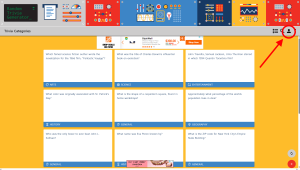
Once you’re signed in, you’ll notice a new My Questions section appear in the user navigation. This is your home base for organizing questions.
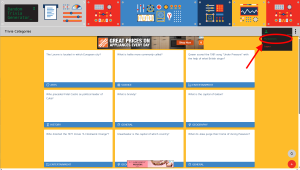
Step 2: Create a Week-Specific List
Before you start saving questions, create a list for the specific trivia night you’re preparing for. Think of each list as a folder for one session.
Navigate to My Questions and click Create New List. Give it a name that makes sense for your workflow – something like:
- May 14 Trivia Night
- Week 12 – Pop Culture Round
- Friday Pub Quiz – Sports Edition
Clear, dated names make it easy to find old lists and avoid accidentally reusing questions from a previous week.
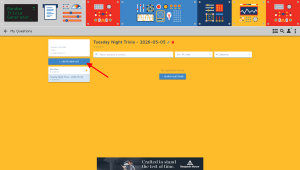
You can create as many lists as you need – one per week, one per category, or one per venue if you host at multiple locations.
Step 3: Browse Questions and Save the Ones You Want
Now for the fun part. Head back to the main generator and start browsing questions. When you find one you like, click the Star button on the back of the card.
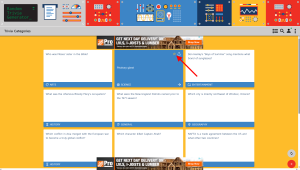
A small menu will appear asking you which list to add the question to. Select the list you just created for this week’s trivia night and confirm.
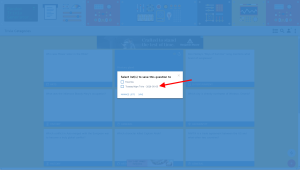
The question is now saved to your list. Repeat this as you browse through categories – film, history, sports, science, whatever mix suits your crowd.
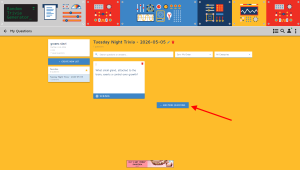
Or, you can press + Add More Questions and search for specific categories, questions, answers and more right there in the user space without going to the main page.
Step 4: Review and Finalize Your List
Once you’ve built up a solid pool of questions, head back to My Questions and open the list for this week. Here you can see everything you’ve saved in one place.
This is a good moment to:
- Check the mix of categories and difficulty levels
- Remove any questions that feel too easy, too obscure, or too similar to each other
- Make sure you have the right number of questions for your format
- Move and organize questions to best suit the flow for the night
Most pub quiz formats run 20–40 questions split across rounds. A good rule of thumb is to save 20–25% more than you need so you have room to cut anything that doesn’t feel right.
Step 5: Host with Confidence
On the night itself, open your list on your phone or laptop and you’re ready to go. No scrambling through browser tabs, no second-guessing which questions you’ve already used – everything is right there, organized exactly how you set it up.
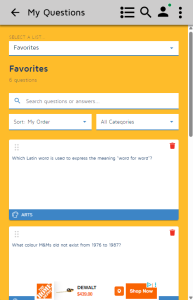
After the event, the list stays in your account. That means you have a permanent record of every question you’ve asked, which makes it easy to avoid repeats in future weeks.
Tips for Getting the Most Out of Your Lists
Name your lists consistently. A naming system like [Date] – [Theme] makes your archive much easier to navigate as it grows. Six months from now, you’ll thank yourself.
Build your list over a few days. The best questions don’t always appear in one sitting. Spend a few minutes with the generator each day leading up to trivia night and let the list grow naturally.
Use separate lists for separate rounds. If your trivia night has distinct rounds, say, a music round, a sports round, and a general knowledge round, consider making a separate list for each. It keeps things clean and makes it easy to swap one round out entirely if the crowd skews a certain way.
Keep a “bank” list for leftovers. When you cut questions from a week’s list, don’t delete them, move them to a general bank list. They’re often perfect for a future week.
Ready to Try It?
User accounts on Random Trivia Generator are completely free. Sign up here and start building your first list in under a minute.
If you host trivia regularly, this is genuinely the fastest way to go from zero to a polished, ready-to-run question set. Give it a try before your next event and see how much smoother the prep feels.
Have questions about using lists or accounts? Drop us a message – we’d love to hear how you’re using the site.
User Accounts and Over 30,000 Questions
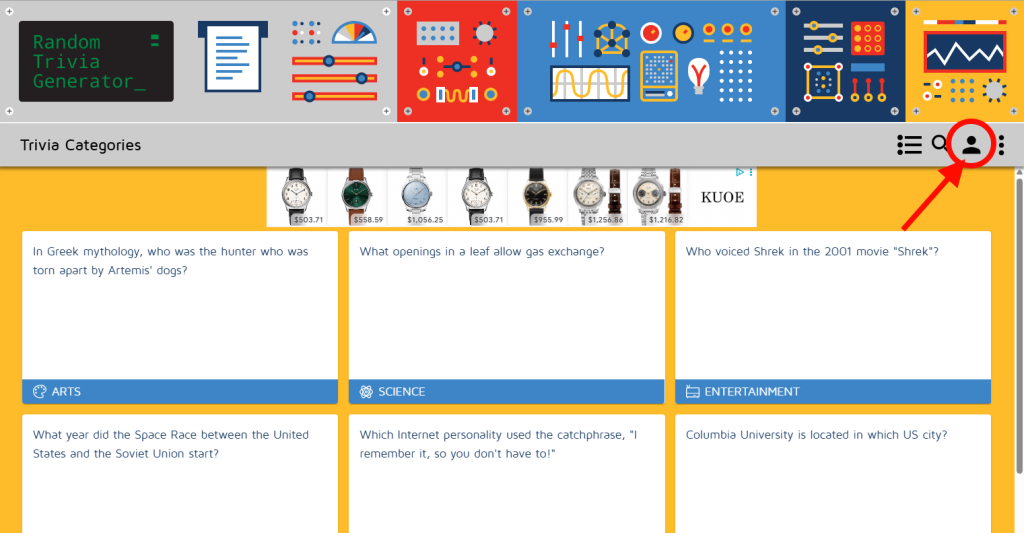
After a length break, I am back with blog updates!
After years of user requests, we recently launched user accounts. You can create a free account where you can save questions, make lists, and more. Create an account, save your questions and be ready for your next trivia night! Free!
Also, there are now over 30,000 human generated, curated, reviewed, edited questions.
Updates: COVID-19
Hello fellow trivia enthusiasts! By now I am sure that most, if not all of you, have been affected by the virus that is quickly spreading around the world. So have we and our kids and spouses. We are all staying home and driving each other crazy 24/7, looking for something to entertain us until this is all over and we can resume our regular lives. We appreciate you choosing our site as your form of entertainment and learning resource. This means a lot to us and is the reason why we are continuing to maintain and improve the site and database. We have noticed an increase in traffic, e-mails, submissions, and general social interactions, and we are trying to address/respond to each one as quickly as we can. After all, we are human and there is only a couple of us. Please be patient if you don’t see your submissions approved or questions or corrections addressed immediately. We are doing our best!
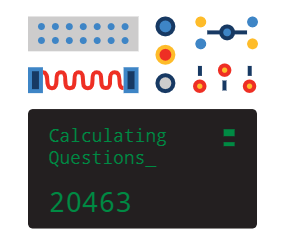
Speaking of submissions…once they are approved and released into the world, you may not see your questions so easily because there are now well over 20,000 unique trivia questions. Don’t believe us? Keep an eye on the question counter accessible through the About page:
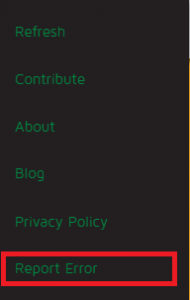
Each of the submissions goes through a vetting process. Each of the questions we come up also goes through a vetting process. BUT because we are simple humans, we too could make mistakes. We do our best not to but it happens. If you see an error, or want to discuss, or dispute a question or an answer, or there is a spelling mistake, please report the error to us and we will address it as quickly as we can. To report an error, simply open the site’s menu and click on the link at the bottom. Alternatively, you could send us an e-mail at [email protected].
Thank you for visiting our site and stay safe out there!
The Random Trivia Generator team
Image credit: Wikimedia

Canadian Thanksgiving 2019
A short trivia round on Canadian Thanksgiving. A few easy and a few hard questions to stump the family with.

Countries starting with a C!
Another geography round. This time it is countries starting with a C…..C for Christmas!